Undo Button for Claude Code: Back Up Your Files Before AI Changes Them

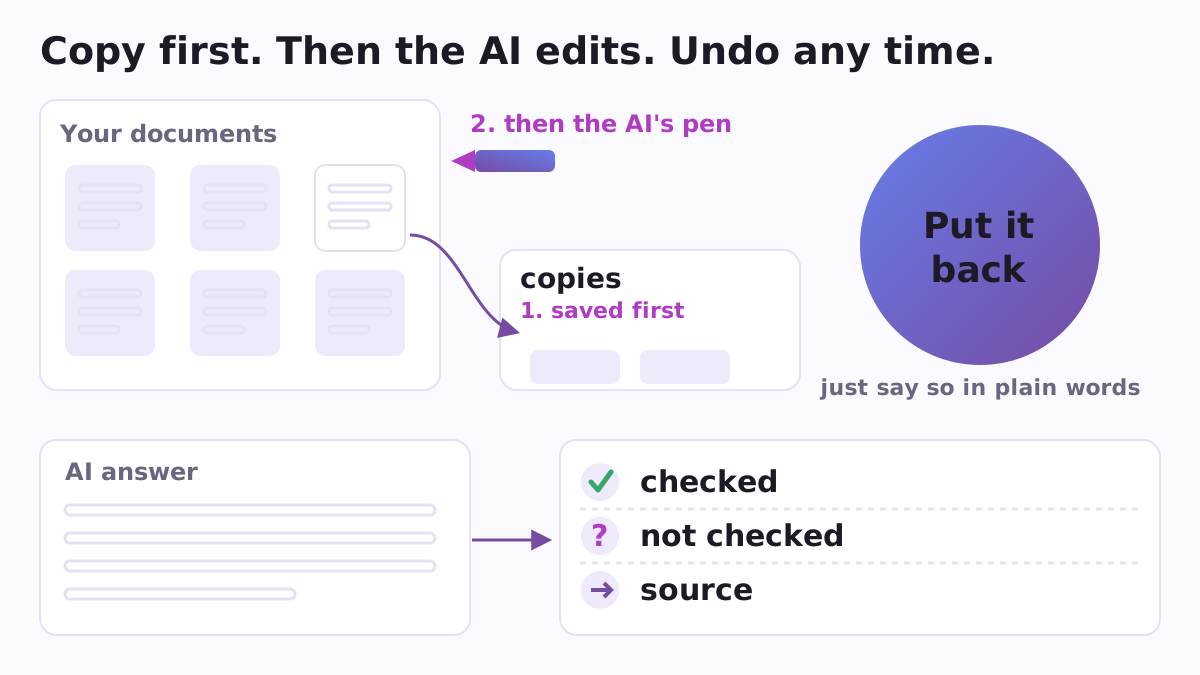
If you are not a programmer and you have a folder of your own documents, letting an AI agent into that folder takes some nerve. Two worries come up again and again: what if it deletes or ruins my files, and what if it says something confident and wrong and I act on it. Safecall is a free, open-source plugin for Claude Code, Anthropic's AI assistant that works with the files on your computer, written for exactly that person. Its promise is short: nothing is written before a copy exists, nothing is read before you have seen the list of what it will read, and no answer ends without saying what nobody checked.
Why you need it
Claude Code has its own rewind feature. It is tied to the session and follows only the edits Claude makes through its own file tools; files changed by a command, such as a deletion or a move, are outside it. Safecall adds a second, independent way back: real copies of your files in a folder of their own, kept for two weeks, that come back when you say so in plain words. You do not have to remember to make them. A small guard does it before every rewrite, and when the work turns from reading to changing, Safecall copies the files it is about to touch.
What it does
- Copies before it changes anything. Before Claude writes to a file that already exists, a hook makes a copy of that file and then lets the write go through. You are not asked anything and nothing is stopped, because a copy costs nothing. A new file is left alone, and reading is never touched.
- Puts things back (
/safecall:undo). Say "put it back the way it was" and the files return as they were. The undo can itself be undone. - Says what will change before it changes (
/safecall:show), in words about meaning rather than lines of difference, and says where things landed afterwards. - Lists before reading (
/safecall:before). It lists the folder and waits before it reads, so you choose which documents go to Anthropic to be read, and it names the kinds of folders worth keeping to yourself. - A receipt under an answer (
/safecall:receipt): three lines, checked, not checked, source. - Reads documents for you.
/safecall:trapsfinds where the catch is in a contract, loan, policy or estimate, each point with a quote./safecall:holesnames what a plan is missing as three questions./safecall:factsseparates what can be checked from opinion. - Before you send (
/safecall:send). It reads a letter or complaint the way a cold stranger would, before it goes: what should not leave, blanks nobody filled in, a tone that will cost you. - Checks names (
/safecall:named): every file an answer mentions must really exist on the disk. - Picks up where you stopped (
/safecall:where)./safecall:clearerturns "umm, that thing with the bank" into a question that can be answered, by guessing two or three versions out loud./safecall:doctorexplains in plain words why the AI is silent.
At the start of each session, Safecall also tells Claude the real date and time of your computer, so it does not wish you good night at ten in the morning, and reminds it where you stopped last time.
A concrete example
You ask Claude to tidy your notes file for the tax advisor. As it starts to rewrite notes.txt, Safecall quietly saves the original into ~/.safecall/copies/, a folder outside your documents where nobody mistakes it for clutter. When you see the result, you decide the old wording was better. You write "put it back", and the original is back.
Files whose names mention a password or a key get special care: a copy of a secret would be a second secret, so instead of copying them Safecall asks you before the change. Copies older than 14 days remove themselves, at most 20 are kept per folder, and files over 5 MB are left out, so the copies never fill your disk.
How to start
You need Claude Code and Python 3 (3.8 or newer). Safecall makes no network calls, has no account and no key; everything it writes is on your own disk, and its hooks run on Mac, Linux and Windows. Install it from the Poly A1 plugins catalogue:
/plugin marketplace add https://raw.githubusercontent.com/vadimchernets/poly-a1-plugins/main/.claude-plugin/marketplace.json
/plugin install safecall@poly-a1
Then, in /plugin, open Marketplaces, choose poly-a1 and enable auto-update, so new versions reach you by themselves.
Safecall pairs well with two siblings: Nightcall, for leaving Claude Code working through the night, and Pocketcall, for leaving the computer working while you go out with your phone. Safecall is under the Apache-2.0 licence; the code, tests and the full list of commands are at github.com/vadimchernets/safecall.
Vadym Chernets also builds Poly A1, an app in which AIs from different companies check each other's work.