What Can AI Do for Me? A Free Guide That Teaches Your Own AI to Lead You, Step by Step
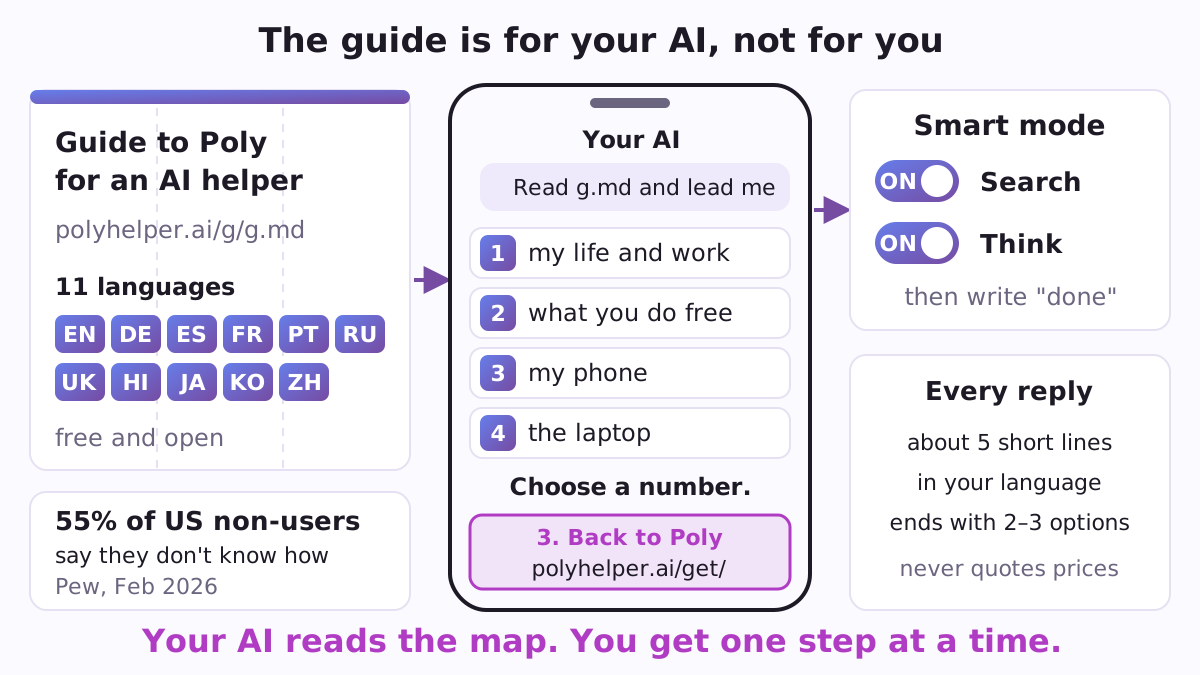
Most people who open ChatGPT, Gemini or Claude for the first time look at an empty box and wonder what to type. The Poly guide fills that gap from the other side: it is not a guide for you, it is a guide for your AI. It is one page your AI reads, and after reading it, the AI knows how to lead you, one short step at a time, in your own language, toward something real you can do with it today.
The guide is free and open. It lives at polyhelper.ai/g/g.md, and the repository on GitHub is its exact mirror in 11 languages: English, German, Spanish, French, Portuguese, Russian, Ukrainian, Hindi, Japanese, Korean and Chinese. It belongs to Poly, an app for iPhone and Android that helps people get real work done with the AIs they already have, with no account and no server. The same repository now also carries Poly, a newer, work-first starter with a small kit for the computer (more on it below).
Why an AI needs a guide
Not knowing where to start is one of the most common reasons people stay away. In a Pew Research Center survey of 5,119 US adults in February 2026, 49% said they ever use AI chatbots and 51% never do; among those who don't, 55% named "don't know how to use them" as a reason (Pew Research Center). And "what can AI do for me" is the first thing Google suggests when you start typing "what can ai do for".
An AI left to itself tends to answer that question with a long list. The guide asks it to do the opposite: start with the job, or with a short hello and four choices, and then one step. It is written in a file format called Markdown (plain text with simple marks for headings and lists), which every AI that can open a web page can read.
What your AI does after reading it
The guide gives the AI a few firm rules. If the message you brought from the Poly app already holds a clear task, the AI does its first useful part right away, with no menu. If there is no task yet, its first reply is only a hello and four numbered keys:
- 1️⃣ AI in my life, work or calling now: the AI asks what you do and what takes your time, names three things it can do for exactly that, and gives you one matching task to practise, such as a résumé, a one-page business plan, a portfolio or a newsletter.
- 2️⃣ You, this AI: the AI speaks about itself, the exact app you are talking to: what it can do for you free right now, with an example from your day, and what its paid plan adds, by the plan's name.
- 3️⃣ My phone: voice, the camera, photos and screenshots, letters and bills, writing a reply, checking a suspicious message or a purchase before you pay, planning a trip or a week, a second AI from another company to check the first, and how to switch chat history off in the AI's settings.
- 4️⃣ Laptop or computer: a free start with Codex in the ChatGPT app, or the fuller path with Claude Code on a Claude Pro plan, as a plugin with no terminal (Codex in the Terminal needs ChatGPT Plus).
Every reply after that stays at about five short lines, in your language and plain words, and where a choice helps it ends with two or three numbered options, so you always know what to tap or type next. A ready result is not the end: the AI offers the next step. The way back to Poly comes once, written out as a full address, when you say the task is done or ask for it. The guide also tells the AI never to quote prices, since they change by country and month: it names the plan and lets the app show the price.
Smart mode: the two buttons most people never press
Right after you pick a number, the AI asks you to switch on its search and reasoning buttons and write "done". The guide carries the English names for each app, checked in November 2026 by asking the apps themselves (13 of 14 AIs answered on 3 November 2026) and by reviews of the apps:
- ChatGPT: "Search" and "Think", in the tools menu by the input box (the + or the sliders icon), both on the free plan with limits.
- Gemini: search is built in; pick "Thinking" in the model menu for harder questions, or "Deep Research" for a long report with sources.
- Claude: "Web search" and "Extended thinking" in the tools menu; extended thinking may come with a paid plan.
- DeepSeek: "DeepThink" and "Search", two buttons under the input box.
- Copilot: "Think Deeper", or the mode menu ("Smart" where it shows); Grok: "Think" and "DeepSearch"; Meta AI often searches and thinks by itself, and in WhatsApp offers "Thinking".
These are the same switches people look up every day: "how to turn on thinking mode chatgpt" and "how to turn on web search in claude" each top Google's suggestions.
An AI that acts, and other AIs on the phone
A new part of the guide answers a question people now type into Google as "can I have an AI agent on my phone". It gives the AI three facts to work with. Muse by Meta does a task itself and asks for your yes before it sends or pays; it is free in the US, Canada and Mexico, so the AI offers it there. On Android, Claude Code can run on the phone itself inside Termux, a free terminal app from F-Droid (an open app store). Everywhere else, and on any iPhone, the way to an AI that works on its own files is the computer.
For someone who wants to try another chat AI, the guide asks for one suggestion, not a list: ChatGPT for voice and talking something through, Claude for long careful writing and reading documents, Gemini for the camera and Google, Meta AI for pictures and quick answers inside WhatsApp, DeepSeek for step-by-step reasoning, Copilot for documents and the web. A Poly screen shows which of them fit your country.
Links that open the right screen in Poly
The second half of the guide is a map of Poly's "doors": web links starting with https://polyhelper.ai/get/ that open a given screen of the app on a phone where it is installed, and the store page where it is not. With them, your AI can hand you exactly the next screen: one of 33 ready jobs (sort my mail, write it for me, a bill: pay or not, a suspicious text, before you pay, a letter to the bank, a trip plan, teach your AI to remember you, hand a task to your AI properly, a short video card and more), a second AI to check the first one's answer, a place to paste that answer back for the check, the list of other AIs, a short game, the map of your whole path, or the laptop path.
Two doors are built by the AI for you. Setup sets Poly up after two or three questions: your language, which AI you use, phone or computer, up to four jobs pinned first, and reminders on or off. A month plan takes the days, the time and up to three small things to do, with minutes per day (5 to 180) and quiet hours if you like, and turns them into reminders on your phone, up to 62 days ahead. Poly shows each one first and asks before applying anything. The links never carry your texts, answers, other people's names, phone numbers, addresses or keys: answers come back to Poly through Share or by pasting.
Short versions for each level
Beside the full guide, each language has four shorter pages for where you are on the path: g-new.md for someone with no job done yet, g-first.md after the first job, g-path.md after the laptop path, and g-pro.md for a programmer, who goes straight to the computer and a schedule. The Poly app picks the right one for you. The current version is Poly 1.0.0, from 6 November 2026; the file g-version.txt holds that marker and a fingerprint of the content, so anyone can see the mirror matches the site, which builds both.
Poly: start with your real task
The a2 folder adds Poly, built on two tests: everything should be clear to a beginner and useful to an experienced person. Instead of a menu, you paste one self-contained prompt (a ready message for your AI) into the AI you already use, and the work happens there. If your task is clear, the AI makes a useful first part at once: a draft, an analysis, a plan, a calculation. If not, it asks one question: "What takes your time or matters to you right now?" It checks every result against your own sources, separates what it verified from what it assumed, and when you ask "what next", it offers one next level on your real task: a better brief, an independent check by a second AI, a reusable method, or an agent on the computer. Nothing has to be copied back to Poly; returning at polyhelper.ai/a2/ is your choice when you want the next tool.
On the phone, the A2 guide points the AI to capabilities that suit your task: deeper thinking and search (DeepSeek and Meta AI among the free choices), voice and camera, calendar and reminders through Claude, connected mail and calendars, images and short videos, and a pair of AIs through Poly Duo on an iPhone with iOS 18 or later. On a computer, it walks three checkpoints you confirm yourself: the working app is open; Claude Code or Codex is signed in and can use your chosen folder; and the first real task has a result you checked. The next step is two AIs in one window: Claude Code or Codex leads and asks the other one for a bounded check, and the answer comes back to the same window.
The repository holds the A2 guide in English and Russian, the ready prompts (start, continue, memory, team, tools and the computer setups, each in English and Russian, generated from the app's own code with a fingerprint per file), templates for AGENTS.md, CLAUDE.md and a continuation card that lets a new chat pick up where the old one stopped, and a computer kit with small Python tools: a search across your own notes that shows the file and line of every answer, a table checker that finds gaps, duplicates and the exact sum and writes a readable report in 11 languages, a converter for PDFs, scans, notes and recordings, a calendar draft builder that makes an .ics file (a calendar file you import yourself) of up to 500 events with overlaps marked, a continuation tool for an existing project, and a producer-and-reviewer workflow of at most three AI calls. Every kit file is listed with its fingerprint in manifest.json.
How to start
- From the Poly app. Install Poly from polyhelper.ai/get, choose a job, and the app hands your AI a message that already points to the guide in your language.
- From any AI chat, without the app. Open ChatGPT, Gemini, Claude, DeepSeek, Copilot or Meta AI and write: "Read https://polyhelper.ai/g/g.md and lead me." For another language, add its folder:
https://vadimchernets.github.io/poly-guide/es/g.mdfor Spanish,/ja/g.mdfor Japanese, and so on. - Answer with a number. Pick 1, 2, 3 or 4, switch on the two buttons, write "done", and follow one step at a time.
- Or start with Poly. Copy the text of
a2/prompts/start.en.txtfrom the repository into your AI and add your task in a line of your own.
If the main address does not open in your AI, the same guide is at vadimchernets.github.io/poly-guide/g.md, and the A2 guide at polyhelper.ai/g/a2.md.
Also in the repository
A small shelf folder describes the computer side of Poly's duel game. A friend sends a duel link from the phone; on a computer, python3 poly.py duel "<link>" --ai (with poly.py from the Poly kit) prints the same cases in the same order, for you or for your own AI (Claude Code, Codex or any other) to answer, and --answers 2,1,3 scores them and prints the link to send back; --new starts a duel of your own. The duel carries no free text, only the game, a seed, a nickname mask and the result.
Where it comes from
The guide is written by Vadym Chernets for Poly and built by the same build as the site, so the mirror changes whenever the site does. It sits next to Poly Duo, which puts ChatGPT and Claude to work as a pair on the phone, and the twelve free plugins of the Poly plugins catalogue for the laptop path; the A2 guide names four of them for a real need: Sidecall, Roundcall, Pocketcall and Calling Kits. The guide, Poly and all the languages are at github.com/vadimchernets/poly-guide.
Vadym Chernets also builds Poly, an app in which AIs from different companies check each other's work.