Ask Multiple AIs at Once and See Where They Disagree

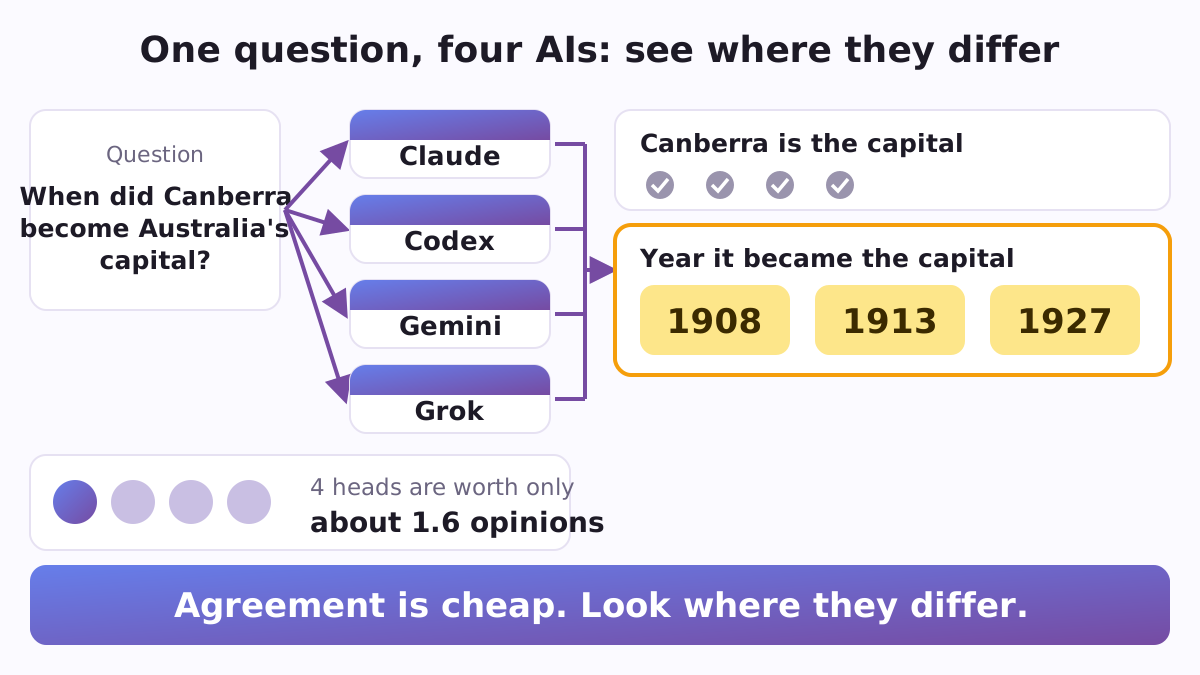
When you ask one AI a question, you get one confident answer and no easy way to tell whether it is right. Asking a second and a third AI helps, but only if you can see where their answers differ, and only if you know how much their agreement is really worth. After Chat is a small set of free, open-source Python scripts that puts one question to several AIs at once and does both: it shows who said what, and it works out what their agreement is worth. It runs on your own computer, through the AI tools you are already signed in to, with no API keys and no extra subscription, and the scripts themselves need nothing but Python.
One AI is not enough, and four AIs are not four
AI models from different companies are trained differently, so they do not always make the same mistakes. That is why people copy one question into ChatGPT, Claude, Gemini and Grok and compare the answers by hand. Their mistakes overlap more than it seems, though. A 2025 study of over 350 language models found that when two models are both wrong, they often give the same wrong answer: on one leaderboard dataset, 60% of the time. So when four AIs agree, you have fewer than four independent confirmations. The real value of asking several is the disagreement: a point only one of them raised, or the same claim with different numbers in it.
A real example
On 21 September 2026 the author put one question to four AI command-line tools: "In one sentence: what is the capital of Australia, and in what year did it become the capital?" All four answered within 25 seconds, and all four said Canberra. On the year they split three ways: 1908, 1913 and 1927. Each year can be defended: the site was chosen in 1908, the city was named in 1913, and Parliament moved there in 1927. Asked alone, Codex would have given 1927 and Grok 1913, each as a plain fact. Side by side, the answers showed at once that the question has three honest answers, and pointed to the exact line a person needs to check.
What is inside
- Ask them all at once (
fanout.py). It first sends each AI tool on its list a quick test question and skips any tool that is not installed or does not answer. Then it puts your question to all the live ones at the same time, under one time limit you choose, and streams each answer into its own file. If a tool is still writing when time runs out, what it has written so far is kept and marked as partial, not thrown away. Each AI starts in its own empty folder rather than in the folder you launched from, so it works from your question alone. A long question, such as a page of text you want all of them to check, goes in a file with--question-file. - See who said what (
provenance.py). It breaks every answer into short claims, groups the claims that are worded alike, and prints one table: each claim, and which AI made it. Under the table come the two lists that matter most: claims made by only one AI (something the others missed, or that one's mistake) and claims where the AIs give different numbers, percentages or dates. It reads any folder of text files, so you can also paste answers from chat websites into files, one per AI, and compare those. - Know what agreement is worth (
neff.py). Give it a handful of questions with known answers, marked right or wrong for each AI, and it measures how often your AIs are wrong together. From that it works out how many independent opinions they are really worth. In the built-in example, four AIs whose mistakes overlap are worth about 1.6 independent opinions, and no number of such AIs would ever be worth more than 2.1. - A second opinion inside Claude Code (
second-opinion/SKILL.md). A ready-made skill: copy the folder into~/.claude/skills/, and Claude Code can ask an AI from another company the same question, show that answer exactly as it came, and add a short table of where the two agree, where they differ, and what only one of them mentions. It never blends the two into one confident text, and it treats the other AI's answer as material to compare, never as instructions to follow. - Safe settings for AI agents (
safety/). A ready example of Claude Code's permission settings (settings.json) that starts every session in plan mode, denies commands such asrm -rf,sudo,curlandgit push, keeps.envfiles and asecretsfolder unreadable, and asks beforerm,mvand web fetches. Settings for Codex let it write only inside its working folder, with the network off, and make it ask before going beyond that. A 14-point checklist covers the habits around them: work in a copy, ask for a plan first, keep an undo, know how to stop a long job. - Tools for researchers (
crossings.py,crossings.schema.json,jsonl_log.py). A record format, with a strict checker, for studies of how people move from chatting with AI to letting AI agents do real work. Installing an app does not count as using it, a finished step needs something the agent actually made, and when someone stops, the record keeps their own words. A tiny logger writes each decision, such as a plan refused or a second opinion taken, as one timestamped line of JSON.
Why it is built this way
Many "LLM council" tools finish with one merged answer. Andrej Karpathy's popular llm-council, for instance, sends your question to the models through OpenRouter, an API service you buy credits for, and lets a "chairman" model write the final reply. After Chat goes through the command-line tools you already use with your own accounts, and it stops before the merge on purpose: you get the table of who said what, and the judgement stays with you. Every script uses only Python's standard library and fits in one short file (the longest is under 200 lines), so you can read exactly what it does and change it.
How to start
The scripts run wherever Python 3 runs; on Windows, run fanout.py inside WSL. A live comparison uses two or more AI command-line tools, signed in with your own accounts. The built-in list covers Claude Code (claude), OpenAI Codex (codex), Google's Antigravity CLI (agy, which took over from Gemini CLI for personal Google accounts on 18 June 2026) and xAI's Grok Build (grok). Each tool's command is one line in a small JSON file passed with --tools, so adding another tool, or following a flag that changed in a new release, takes a minute. No command-line tool at all? Paste the answers from any AI chat website into .txt files, one per AI, and run provenance.py on that folder: each file's name becomes a column of the table.
git clone https://github.com/vadimchernets/after-chat
cd after-chat
python3 neff.py --demo                       # what four agreeing AIs are worth
python3 fanout.py "Your question" --out run  # ask every live AI at once
python3 provenance.py run                    # who said what, and where they differ
The 28 tests run with python3 -m unittest tests/test_patterns.py. The code, its tests and the safety settings are all at github.com/vadimchernets/after-chat.
Where it comes from
After Chat is the companion code of the paper After Chat: The Three Transitions Between Non-Programmers and Agentic AI by Vadym Chernets (September 2026, SSRN 7520019, DOI 10.2139/ssrn.7520019). The paper asks why so few people have moved from chatting with AI to letting AI agents work for them, and how to measure that move. The code is under the MIT licence and archived on Zenodo (DOI 10.5281/zenodo.22944451). Two ready-made Claude Code plugins grew out of the same patterns: Sidecall asks the AI command-line tools on your computer, and Roundcall asks AI chat sites through your own browser.
Vadym Chernets also builds Poly A1, an app in which AIs from different companies check each other's work.