Stop AI From Leaking API Keys, Card Numbers and Client Files

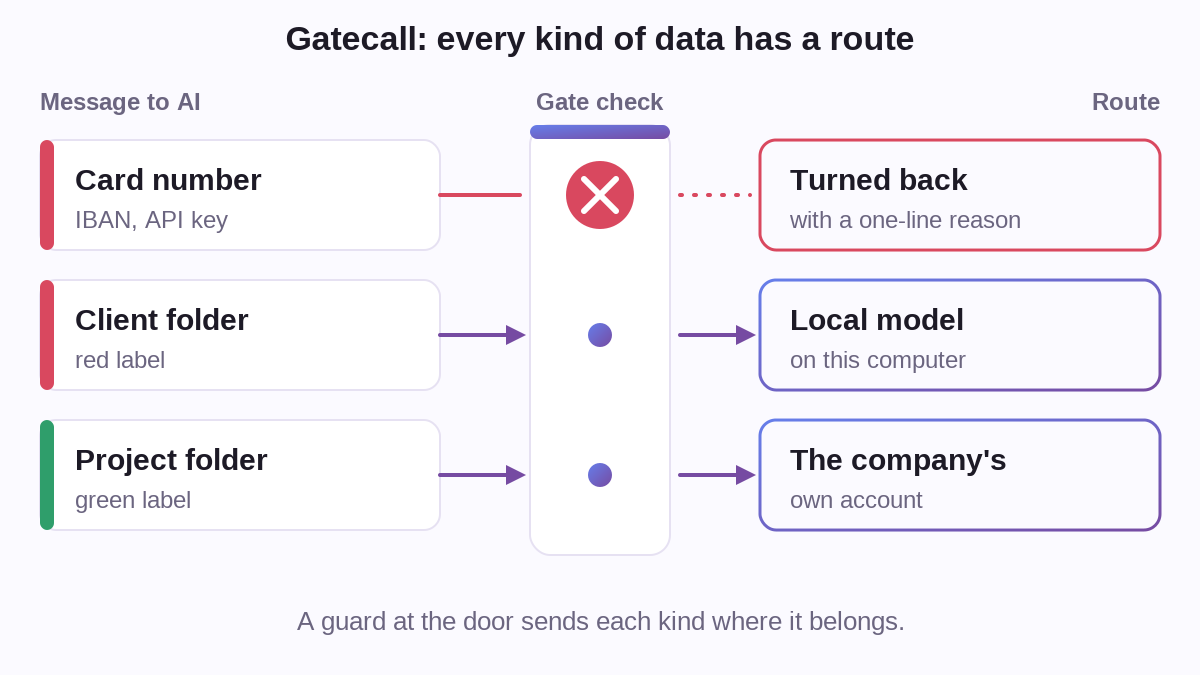
Most people use AI with a simple hope: that nothing they paste in will ever matter. Then a card number slips into a message, an API key (the secret password a program uses to reach a paid service) ends up in a command, or a whole spreadsheet of client addresses goes into a chat so that it can be "tidied up". Companies know this. Some ban AI altogether, which costs them the benefit. Others write a policy that nobody reads at the moment of pasting.
Gatecall is a free, open-source plugin for Claude Code, Anthropic's AI assistant that works with the files on your computer. It puts the company's rule exactly where the mistake happens, and it gives people a way forward instead of only a "no": red folders are read by a model on this computer, the company's work goes to the company's own accounts, and a key, a card, an IBAN, an ID number or a list of people's addresses never leaves in a message by accident. Gatecall itself sends nothing and buys nothing.
Why you would want it
"Is it safe to put confidential information into Claude?" is the first thing Google suggests when you start typing that question, followed by the same question about Copilot, ChatGPT and Gemini. People already do it: in a January 2025 TELUS Digital survey of 1,000 US employees at large companies, 57% said they had entered confidential information into AI assistants, and only 29% said their company had clear AI guidelines (Business Wire).
Claude Code can read files, run commands and call web tools on your computer, so the question matters even more there. A GitHub issue on the Claude Code repository describes secrets showing up even though the project's instructions told the assistant not to touch them. A written instruction is a request; a check that runs before the step is a lock. The best-known case outside coding is Samsung in 2023, where engineers pasted source code and a meeting transcript into a chatbot. Nobody meant harm. They were just working fast.
What it gives you
- A stop before the message leaves. Gatecall looks for API keys and tokens, card numbers (checked with the standard Luhn test, so ordinary long numbers pass), IBANs (checked with the mod-97 test), national ID numbers with their check digit (United States, United Kingdom, Spain, Portugal, Brazil, France, Italy, Germany, the Netherlands, Poland, Ukraine and Russia), and lists of e-mail addresses or phone numbers (five or more; three or more under the EU profile). If it finds one, the message is held and you are told why in plain words, with only the last four characters shown.
- In the language of the person at the keyboard. Since version 0.1.6 the reasons come in eleven languages: English, Spanish, Portuguese, Russian, Ukrainian, German, French, Hindi, Japanese, Korean and Chinese. Gatecall takes the language from the company policy, or else from the computer's own language setting, and falls back to English for any word not yet translated. A team spread across several countries reads the same rule, each in their own words.
- The same check on actions. Before the assistant runs a command, reads or edits a file, searches, fetches a web page or calls a connected tool, the same look happens. Since version 0.1.5 this also covers edits made through OpenAI's Codex, which changes files with a "patch": Gatecall reads the file names out of the patch and holds them to the same rules.
- Red, yellow and green folders. You say which folders hold what must stay in the company: client files, staff records, contracts, health or bank records. Red folders open only in the "red window": a session with a model running on your own computer, opened through the companion plugin Routecall, where no web tool and no network program reaching outside runs. Every other session, an ordinary local one included, is kept out. Yellow folders are work that may go to the company's own accounts, such as Claude Team or Enterprise seats or an API with zero data retention. Everything else is green.
- Safe copies for other AI tools. Kimi can work in a training folder of practice files, which a person marks, never the assistant. Grok can work on a cleaned copy: no red folders, no key files, and inside every file, office documents included, keys, cards, IBANs, ID numbers and address lists are masked, so a card shows up as
[card ********7899]. A PDF or an image, which cannot be read as text, stays out of the copy and is named with the reason. Google's agy never gets a permission for everything; the text goes inside the question instead. - Ready company profiles. Pick
default,eu(ID numbers of every EU country it knows),us-federal-contractor(no DeepSeek model, API or weights, and no API of Zhipu, citing section 1532 of the FY2026 defence act) orus-dod-strict(the wider list a contract may ask for). Profiles add up. A company can also close the AI services of particular countries or vendors with one line in its policy, while the same vendor's hosts elsewhere stay open. - A permissions block for Claude Code. Gatecall writes the
permissions.denyrules that close red folders to the sessions that talk to a cloud model, with full paths, so they hold from any folder.
A journal the security team can trust
Every stop is recorded by time, folder, kind and rule. The value itself is never stored: only a fingerprint (a short code made from the value with the company's own secret key, called an HMAC), so the same card coming back twice can be counted, and without the key nobody can work back to the number, not even by trying every possible one. A company can choose to keep ID numbers only as a count, with no fingerprint at all. Records are deleted after a retention period (90 days unless you choose another) and can be exported as a spreadsheet file or as JSON Lines for the security team.
The journal and its key are readable by their owner only, and only Gatecall opens them. A step that tries to read, search or edit them is stopped; if a search happens to reach the key anyway, the key is taken out of the result before Claude sees it (Claude Code 2.1.227 or later). If the security team already has a card number, it can check it against the journal with one openssl line shown in the README.
A concrete example
An accountant at a small firm asks Claude to "check this list of clients and chase the late ones", and pastes a table with names, e-mail addresses and IBANs. With Gatecall installed the message does not go out. The accountant sees one plain line, in their own language: the text holds IBANs and a list of addresses. Then they take the route Gatecall points to: the clients folder is marked red, so a model on their own computer reads it in the red window, or they make a cleaned copy in which the IBANs and addresses are masked. The work still gets done, and the bank details stay in the building.
How to start
You need Claude Code on macOS, Linux or Windows, and Python 3.8 or newer; Gatecall finds a real Python for you and says so in one line at the start of a session if there is none. No account and no payment are needed. In Claude Code, type:
/plugin marketplace add https://raw.githubusercontent.com/vadimchernets/poly-a1-plugins/main/.claude-plugin/marketplace.json
/plugin install gatecall@poly-a1
The first line adds the Poly catalogue by its link, with no git or GitHub account. Then say "set up the data rules for our company". The assistant asks, one at a time, which folders are red and which are yellow, which country you are in and whether you work in the EU or under a US defence contract, whether any countries or vendors are off limits, and how long to keep the journal. It writes a company-ai-policy.json file and the matching permission block. The policy can also name the language the guard speaks, such as "language": "es". A policy placed in the company folder holds in every folder inside it, and one installed by an administrator wins over the rest.
Useful phrases afterwards: "where may this folder go?" shows the routes, "scan this file" shows what would be stopped or masked, "make a clean copy for Grok" makes the masked copy, and "what did the guard stop this week?" reads the journal.
Where it comes from
Gatecall is written by Vadym Chernets and released under the Apache-2.0 licence; its recognizers follow those of Microsoft's Presidio. The current version is 0.1.6, from 19 October 2026, with 97 automated tests and a Zenodo archive (DOI 10.5281/zenodo.23116724). It uses only Python's standard library and contains no network code; a test fails the build if any appears.
Gatecall works with the other company plugins: Firmcall installs the same policy file on every laptop, Routecall opens the local-model window that may read red folders, and Billcall reads the same policy to count what AI costs. All of them are in the Poly plugins catalogue.
The code, tests and full list of settings are at github.com/vadimchernets/gatecall.
Vadym Chernets also builds Poly, an app in which AIs from different companies check each other's work.